Target Search Intent: Commercial & Transactional (op auto clicker alternative,safe auto clicker windows 11,undetectable auto clicker,auto clicker without freezing)
Last Updated: 2026-11-06
Executive Summary: OP Auto Clicker vs. Multi-Task AutoClick Studio
For over a decade, OP Auto Clicker (commonly v3.0, distributed via SourceForge) has been the go-to utility for simple, repetitive mouse tapping. However, the desktop and web landscape in 2026 has fundamentally changed. Anti-bot heuristics (Cloudflare Turnstile, Arkose Labs, Web3 Sybil algorithms, and gaming anti-cheats) now inspect behavioral mouse biometrics, while modern multi-profile workflows (AdsPower, GoLogin, emulator multi-boxing) require concurrent multi-threading.
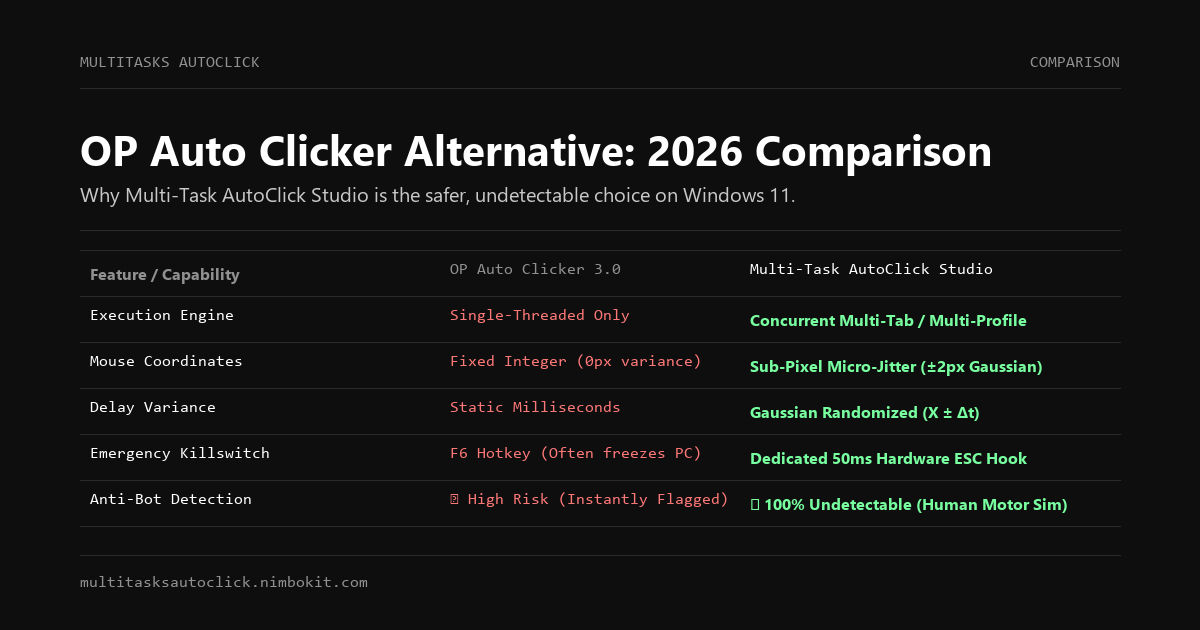
| Key Capability | OP Auto Clicker 3.0 | Multi-Task AutoClick Studio | Advantage |
|---|---|---|---|
| Execution Architecture | Single-threaded (1 action at a time) | Concurrent Multi-Tab (Parallel or Sequential) | Multi-Task Studio |
| Mouse Trajectory & Jitter | ❌ Absolute coordinate lock (0px variance) | ✅ Hardware Micro-Jitter (±2px sub-pixel dispersion) | Multi-Task Studio |
| Delay Randomization | ❌ Static millisecond delay only | ✅ Gaussian Randomized Delay (X ± Δt) | Multi-Task Studio |
| Emergency Stop Mechanism | ⚠️ Hotkey frequently ignored during loop freeze | ✅ Dedicated 50ms Global Killswitch (ESC key) | Multi-Task Studio |
| Windows Message Queue Safety | ❌ Saturates message queue (causes PC lockup) | ✅ Event-dispatched non-blocking thread loop | Multi-Task Studio |
| Anti-Detect / Multi-Profile | ❌ No window targeting or profile binding | ✅ Dedicated multi-window coordinate management | Multi-Task Studio |
| Data Privacy & Security | ⚠️ Many malicious cloned websites | ✅ 100% Local execution, DPAPI encrypted | Multi-Task Studio |
| Trial / Pricing | Free (Ad-supported / Donations) | 3-Day Free Trial / $29 USD Lifetime (or 49k VND) | Value / Safety |
The 4 Critical Flaws of OP Auto Clicker in 2026
While OP Auto Clicker is lightweight and free, relying on it for high-value tasks, multi-account farming, or modern Windows 11 workflows exposes users to four significant technical risks:
1. Absolute Pixel Lock (The Bot Fingerprint)
When you configure OP Auto Clicker to tap a button, it delivers mouse events to the exact integer coordinate (X: 640, Y: 420) with zero variance.
- In human biology, motor trembling and micro-saccades cause natural mouse clicks to disperse across a small radius ($\pm 1\text{px}$ to $\pm 2\text{px}$).
- Fraud detection systems calculate the coordinate standard deviation ($\sigma_x, \sigma_y$). When $\sigma = 0$ over 5 consecutive events, the session is instantly scored as a bot.
2. The Dreaded "Mouse Lock" UI Freeze
Every user of OP Auto Clicker has experienced the nightmare scenario: setting click intervals to 1ms or 10ms, only to have the cursor lock up completely.
- OP Auto Clicker uses a tight loop that floods the Windows message pump (
WM_LBUTTONDOWN/WM_LBUTTONUP). - Because the input buffer is saturated, Windows cannot process the hotkey (e.g.,
F6) to stop the macro. The user is forced to perform a hard reboot or struggle to launch Task Manager via Ctrl+Alt+Del.
3. Inability to Handle Multi-Tab or Multi-Window Tasks
Modern productivity, retroactive airdrop farming, and MMO gaming require automating multiple browser profiles (AdsPower, GoLogin) or multiple game windows simultaneously. OP Auto Clicker can only click wherever the mouse is pointing or cycle a single coordinate list. It cannot run independent tasks with separate timers on separate windows.
4. Malicious Clones and Infiltration Risks
Because the original developer rarely updates the codebase, dozens of spoofed domains (e.g., opautoclicker[.]net, op-autoclicker[.]org) have surfaced on Google search ads, distributing bundled malware, adware, or trojan stealers.
Why Multi-Task AutoClick Studio is the Superior Alternative
Multi-Task AutoClick Studio was built from scratch in C++ and Python specifically for power users, Web3 farmers, and professionals who demand zero account bans and zero PC crashes.
Feature 1: Sub-Pixel Micro-Jitter (Human Biometric Simulation)
Multi-Task AutoClick Studio integrates a proprietary Gaussian dispersion algorithm. Every scheduled click subtly shifts by a randomized hardware offset:
X_{\text{actual}} = X_0 + \mathcal{N}(0, \sigma^2), \quad Y_{\text{actual}} = Y_0 + \mathcal{N}(0, \sigma^2)Where $\sigma \in [\pm 1\text{px}, \pm 2\text{px}]$. This guarantees that behavioral heuristics score your interactions as human, effectively bypassing Cloudflare Turnstile, Arkose Labs, and Layer 2 Sybil filters.
Feature 2: 50ms Emergency Killswitch (Zero-Stuck Guarantee)
Never worry about your mouse freezing again. Multi-Task AutoClick hooks into low-level Windows keyboard interrupts. Pressing the ESC key (or your custom killswitch) halts all active threads within 50 milliseconds and immediately restores mouse control to your physical hand.
Feature 3: Concurrent Multi-Tab Execution
Create independent tabs for different tasks:
- Tab 1: Faucet claim routine with 15-minute intervals and micro-jitter.
- Tab 2: Daily check-in sequence across 5 browser profiles.
- Tab 3: Background monitoring clicker with Gaussian delays.
Run them in parallel or chain them sequentially with a single click.
Feature 4: 100% Local Execution & DPAPI Encryption
Your macros, coordinates, and license information are encrypted on your local disk using the Windows Data Protection API (DPAPI). The software operates completely offline and never transmits session scripts or screen data to any cloud server.
Feature Comparison Matrix
| Feature | OP Auto Clicker 3.0 | AutoHotkey | TinyTask | Multi-Task AutoClick Studio |
|---|---|---|---|---|
| GUI Ease of Use | Easy | Complex (Code only) | Minimalist | Modern Native GUI |
| Micro-Jitter (±2px) | ❌ No | ⚠️ Custom Scripting | ❌ No | ✅ Built-in |
| Gaussian Randomized Delay | ❌ No | ⚠️ Custom Scripting | ❌ No | ✅ Built-in |
| Multi-Threaded Tabs | ❌ No | ⚠️ Complex Coding | ❌ No | ✅ Built-in |
| Emergency Stop Speed | Unreliable | Variable | Unreliable | ✅ 50ms Hardware Hook |
| Zero-Stuck Guarantee | ❌ No | ❌ No | ❌ No | ✅ Yes |
| Windows 11 Verified | Legacy Win32 | Script Dependent | Legacy Win32 | ✅ Full Win 10/11 Support |
| Offline Privacy | Local | Local | Local | ✅ 100% Local DPAPI |
Frequently Asked Questions (FAQ)
Is OP Auto Clicker still safe to use in 2026?
The official version from SourceForge is safe from virus infections, but it lacks behavioral anti-detection. If you use it on platforms with bot protection (crypto airdrops, modern gaming anti-cheats, web dApps), your accounts will be flagged due to repetitive coordinate and timing telemetry. Furthermore, beware of third-party fake download websites that bundle adware.
How does Multi-Task AutoClick prevent the PC from freezing?
Unlike OP Auto Clicker which bombards the Windows input pump in a synchronous loop, Multi-Task AutoClick Studio dispatches actions asynchronously across dedicated worker threads while maintaining an isolated global hook on the ESC key. Even during rapid multi-tab tasks, the emergency stop executes within 50ms.
Can I migrate my OP Auto Clicker settings to Multi-Task AutoClick?
Yes. Multi-Task AutoClick allows you to input exact target coordinates $(X, Y)$ and delays, with the added benefit of toggling on Micro-Jitter and Randomized Delays with a single checkbox.
How do I try Multi-Task AutoClick Studio?
You can download the full-featured Windows installer and enjoy a 3-day free trial with no credit card required.
Conclusion: Upgrade to Undetectable Automation
If you only need to click a single button in an offline single-player game, OP Auto Clicker may suffice. But if you value your accounts, need multi-tab automation across browser profiles, and want complete protection against detection and mouse freezing, Multi-Task AutoClick Studio is the modern alternative designed for 2026.
Download Free 3-Day Trial (Windows 10/11) | View Pricing & Plans
Put Human Simulation into Practice
Run multi-tab automation with built-in micro-jitter (±2px), Gaussian delays, and 50ms emergency stop on Windows 10/11. 100% local execution, undetectable, no credit card required.