Target Search Intent: Commercial & Informational (tinytask alternative,tinytask alternative windows 11,safe tinytask alternative,tinytask mouse freeze fix)
Last Updated: 2026-11-06
Executive Summary: TinyTask vs. Multi-Task AutoClick Studio
TinyTask earned massive popularity over a decade ago as a featherweight (35 KB) macro recording tool for Windows. It did one thing well: record mouse movements and keystrokes, then play them back in an infinite loop.
However, in 2026, TinyTask is abandonware. It has not received active maintenance for years, leading to critical incompatibility issues on modern Windows 11 systems, high-DPI displays (2K/4K), and modern multi-monitor setups. Worse, its lack of randomized variance makes it an instant trigger for modern anti-bot and Sybil detection systems.
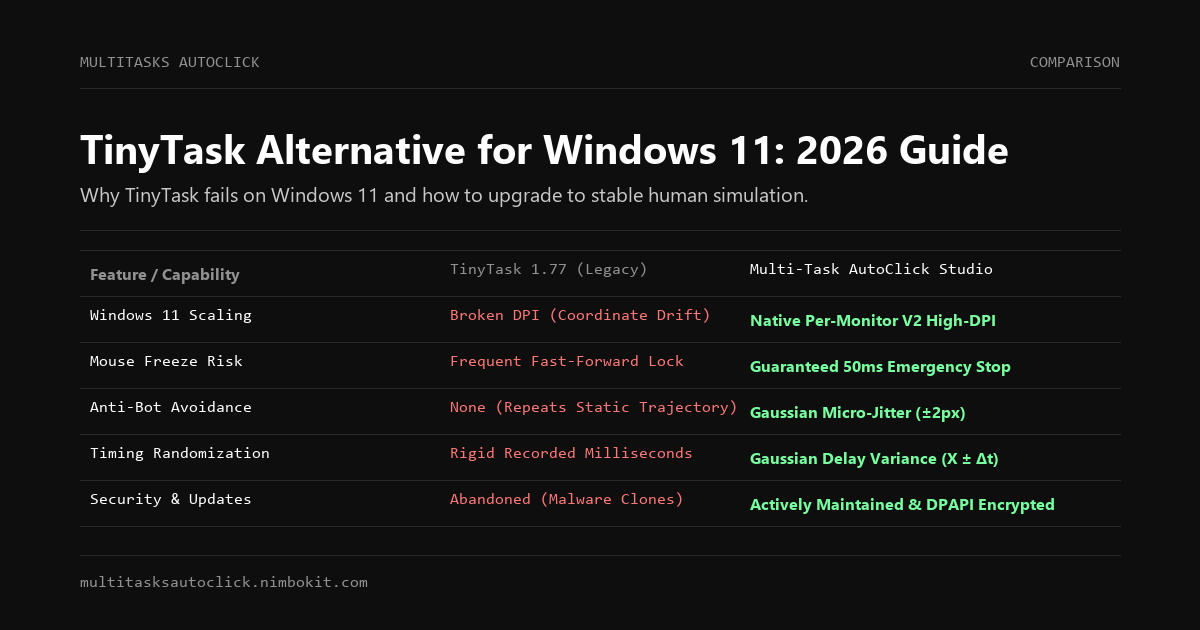
| Key Capability | TinyTask (v1.77 / Legacy) | Multi-Task AutoClick Studio | Advantage |
|---|---|---|---|
| Windows 11 High-DPI Support | ❌ Broken (Clicks drift on 125%/150% scaling) | ✅ Native Per-Monitor V2 DPI awareness | Multi-Task Studio |
| Emergency Stop Reliability | ❌ Playback locks cursor; stop hotkey ignored | ✅ Dedicated 50ms hardware interrupt (ESC) | Multi-Task Studio |
| Anti-Bot & Sybil Avoidance | ❌ None (Repeats rigid recorded coordinates) | ✅ Hardware micro-jitter (±2px Gaussian) | Multi-Task Studio |
| Timing Randomization | ❌ None (Replays exact recorded delta-times) | ✅ Gaussian delay variations (X ± Δt) | Multi-Task Studio |
| Task Concurrency | ❌ Single linear loop only | ✅ Multi-Tab concurrent workflows | Multi-Task Studio |
| Maintenance & Security | ⚠️ Abandoned; rampant fake malware sites | ✅ Actively maintained; 100% clean DPAPI | Multi-Task Studio |
| Multi-Profile Automation | ❌ Cannot bind to background windows/profiles | ✅ Optimized for AdsPower, GoLogin, Emulators | Multi-Task Studio |
| Trial / Pricing | Free (Abandonware) | 3-Day Free Trial / $29 USD Lifetime (or 49k VND) | Modern Safety |
The 4 Critical Reasons TinyTask Fails on Modern Windows 11
1. The High-DPI Coordinate Drift Bug
The original TinyTask was built using legacy Win32 API functions during the Windows 7 era when 1080p at 100% display scaling was the standard.
- On modern Windows 11 laptops and desktop monitors running at 1440p (2K) or 2160p (4K) with 125%, 150%, or 200% scaling, Windows applies automatic DPI bitmap scaling.
- As a result, TinyTask's recorded coordinates drift away from actual UI elements. Clicks miss buttons by 20 to 50 pixels, causing macros to fail and click unintended desktop areas.
- Multi-Task AutoClick Studio implements native Per-Monitor V2 High-DPI awareness, ensuring mathematical pixel accuracy on any display scaling configuration.
2. The Notorious "Fast-Forward Mouse Lock"
A common feature in TinyTask is speeding up playback ($2\times, 5\times, 10\times$). When accelerated, TinyTask creates a synchronous flood of input events.
- The Windows message queue becomes completely overwhelmed.
- Because the message pump cannot process incoming physical keyboard events, pressing the configured stop hotkey (e.g.,
Ctrl+Shift+Alt+PorF8) fails to register. - The user's mouse is held hostage, clicking erratically across open windows, leaving no choice but a hard power reset.
3. Absolute Behavioral Predictability
Modern web platforms, crypto dApps, and anti-cheat systems employ behavioral biometric analysis.
- When TinyTask replays a recording, it executes identical coordinate paths and mechanical pauses over and over again.
- An anti-bot algorithm looks at two successive macro iterations. If the click timing delta and pixel trajectories match within 1 millisecond, the profile is permanently blacklisted.
4. Poisoned Google Search Results & Trojan Clones
Because official development has stalled, malicious actors have registered hundreds of clone domains (e.g., tinytask[.]org, tinytask[.]net, tinytaskdownload[.]com) targeting the keyword TinyTask. Many of these distributed .exe files bundle infostealers (RedLine, Vidar, Lumma Stealer) that target browser cookies and cryptocurrency wallets.
Why Multi-Task AutoClick Studio is the Modern Replacement
Multi-Task AutoClick Studio delivers the simplicity of quick macro execution while replacing legacy Win32 hacks with enterprise-grade stability and stealth.
1. 50ms Emergency Killswitch (Zero-Stuck Guarantee)
You will never have your computer locked by an out-of-control macro again. Multi-Task AutoClick hooks into low-level Windows keyboard interrupts. Tapping the ESC key terminates all background threads and releases all mouse hooks in less than 50 milliseconds, instantly returning full mouse control to your hand.
2. Biometric Micro-Jitter (Undetectable Automation)
Every click action incorporates natural motor dispersion using Gaussian randomness:
X_{\text{actual}} = X_0 + \mathcal{N}(0, \sigma^2), \quad Y_{\text{actual}} = Y_0 + \mathcal{N}(0, \sigma^2)Where $\sigma \in [\pm 1\text{px}, \pm 2\text{px}]$. Rather than hitting the exact same pixel, your clicks disperse naturally like a living human operator, passing modern behavioral bot checks effortlessly.
3. Multi-Tab Concurrent Workflows
Instead of being restricted to one rigid linear loop, Multi-Task AutoClick Studio lets you organize workflows into visual tabs:
- Tab 1: Run periodic faucet claiming in background browser profiles.
- Tab 2: Execute repetitive data entry in foreground applications.
Run them in parallel or chain them sequentially with independent delay schedules.
Feature Matrix: TinyTask vs. Modern Automation Tools
| Feature | TinyTask 1.77 | Macro Recorder (Jitbit) | Multi-Task AutoClick Studio |
|---|---|---|---|
| Windows 11 High-DPI Support | ❌ Broken | ✅ Supported | ✅ Native Per-Monitor V2 |
| Emergency Stop Speed | ❌ Swallowed when frozen | ⚠️ 200ms - 500ms | ✅ 50ms Hardware Interrupt (ESC) |
| Micro-Jitter Biometrics (±2px) | ❌ No | ❌ No | ✅ Built-in Gaussian Jitter |
| Randomized Delay Engine | ❌ No | ⚠️ Basic Delay | ✅ Built-in Gaussian Delays |
| Concurrent Multi-Tab Execution | ❌ No | ❌ No | ✅ Parallel & Sequential Tabs |
| Software Maintenance | ❌ Abandoned | ✅ Active ($99) | ✅ Actively Maintained ($29 / 49k VND) |
| 100% Offline & Private | ✅ Local | ⚠️ Online License Check | ✅ 100% Local DPAPI Encrypted |
Frequently Asked Questions (FAQ)
Is TinyTask safe to download in 2026?
The historical original build from reputable archives is harmless, but the official developer has stopped updating the tool. Today, dozens of fake websites populate Google search results distributing malware disguised as TinyTask. If you require a safe, modern alternative, Multi-Task AutoClick Studio is signed, 100% clean, and encrypts all local data via Windows DPAPI.
Why does TinyTask miss buttons on my Windows 11 laptop?
TinyTask does not recognize per-monitor DPI scaling. If your screen is set to 125% or 150% display zoom (common on modern Windows 11 laptops), TinyTask miscalculates the coordinates by a scaling factor, resulting in clicks landing far away from your intended targets.
How does the Multi-Task AutoClick emergency stop work?
Multi-Task AutoClick Studio monitors the ESC key via a dedicated asynchronous hook outside the main message loop. Even if a macro is firing at maximum frequency, pressing ESC terminates all threads and releases the mouse hook within 50ms.
Can I test Multi-Task AutoClick Studio for free?
Yes. You can download the official setup package and begin a 3-day full-feature trial immediately without providing any credit card or payment information.
Conclusion: Upgrade from 2012 Abandonware to 2026 Stealth
TinyTask served its purpose in an era of simple desktop games and basic Windows 7 forms. But for modern Windows 11 workflows, anti-detect browser automation, and stealth tasks, continuing to use abandoned software risks both your accounts and your computer's stability.
Upgrade to Multi-Task AutoClick Studio for true multi-tab power, sub-pixel human simulation, and a guaranteed 50ms emergency killswitch.
Download Free 3-Day Trial (Windows 10/11) | View Pricing & Plans
Put Human Simulation into Practice
Run multi-tab automation with built-in micro-jitter (±2px), Gaussian delays, and 50ms emergency stop on Windows 10/11. 100% local execution, undetectable, no credit card required.