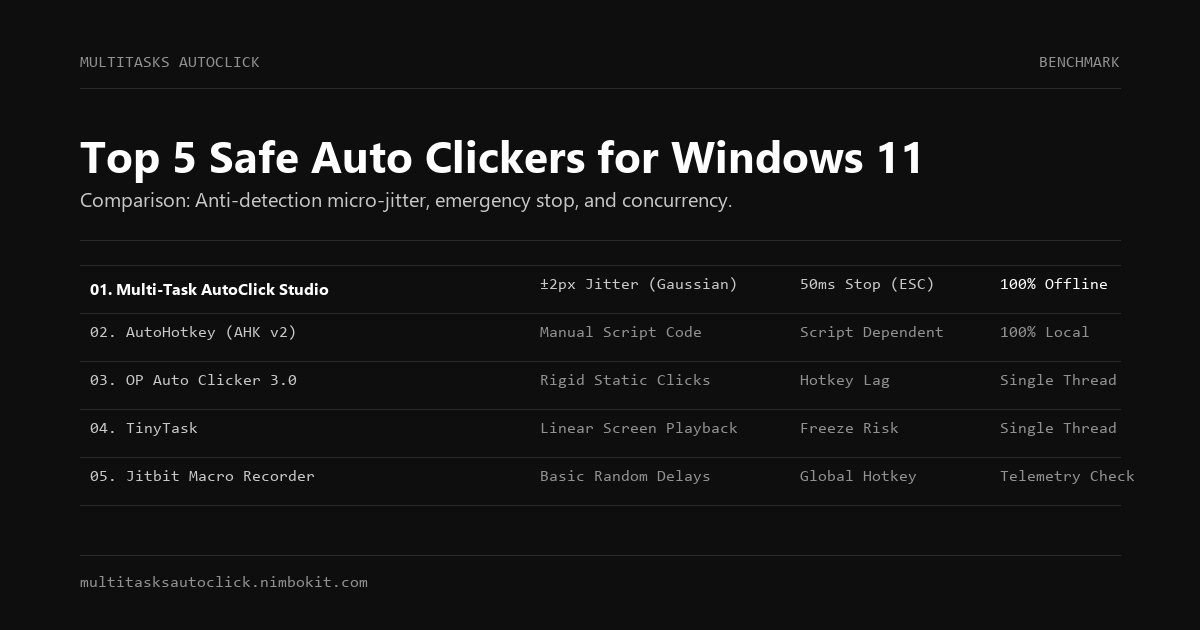
If you are looking for an auto-clicker for Windows 11, you have likely encountered OP Auto Clicker 3.0 or TinyTask. While these legacy tools have existed for over a decade, using them in 2026 presents serious challenges:
- Detection risk: Modern anti-bot and game anti-cheat systems easily detect static, mechanical click intervals.
- Mouse locking: Infinite loops with no responsive emergency stop can completely freeze your computer, forcing a hard reboot.
- Malware threats: Many websites offering "free cracked clickers" bundle trojans, keystroke loggers, and crypto drainers.
Below is an objective breakdown of the Top 5 safest and most reliable auto-clickers for Windows 10/11 in 2026, compared across safety, human-simulation capabilities, multi-threading, and pricing.
Quick Comparison Matrix
| Software | Jitter & Anti-Detection | Multi-Tab Concurrency | Emergency Killswitch | Local Privacy | Best For | Price |
|---|---|---|---|---|---|---|
| 1. Multi-Task AutoClick Studio | ✅ Yes (±2px) | ✅ Yes (Multi-tab) | ✅ 50ms Instant (ESC) | ✅ 100% Offline | Multi-accounting, Web3, MMOs, Power Users | Free Trial / \$29 Lifetime |
| 2. AutoHotkey (AHK v2) | ⚠️ Custom code required | ⚠️ Complex scripting | ⚠️ Script-dependent | ✅ 100% Local | Developers & Script writers | Free (Open Source) |
| 3. OP Auto Clicker 3.0 | ❌ Rigid static clicks | ❌ Single thread only | ⚠️ Hotkey lag | ✅ Local | Basic single-point spamming | Free |
| 4. TinyTask | ❌ No randomization | ❌ Linear playback | ⚠️ Prone to freeze | ✅ Local | Extremely lightweight recordings | Free |
| 5. Jitbit Macro Recorder | ⚠️ Basic delays | ❌ Single sequence | ✅ Responsive hotkey | ⚠️ Telemetry checks | Office UI workflows & automation | \$39 – \$99 |
1. Multi-Task AutoClick Studio (Best Overall for Safety & Power Users)
Website: multitasksautoclick.nimbokit.com
License: Free 3-Day Trial / 49k VND / \$29 Lifetime
Designed specifically to address the vulnerabilities of legacy clickers, Multi-Task AutoClick Studio is built for users running repetitive workflows on Windows 10/11 where getting banned or detected is unacceptable.
Key Advantages:
- Biological Micro-Jitter (±2px): Disperses click coordinates within a realistic human radius around target points, completely bypassing Sybil bot detection and heuristic behavior analyzers.
- Gaussian Randomized Delays: Eliminates mechanical clock cycles. Timing between keystrokes and clicks varies dynamically.
- 50ms Global Emergency Stop (
ESC/F6): Hardware-level interrupt that releases mouse hooks in 50 milliseconds, eliminating computer lockups. - Multi-Tab Parallelism: Configure separate tabs for different windows or anti-detect browser profiles (AdsPower, GoLogin) to run concurrently.
- Zero Cloud Footprint: Runs 100% locally and offline without transmitting session data or scripts.
Cons: Desktop-only (Windows 10/11); commercial license required for lifetime multi-device use.
2. AutoHotkey (Best for Developers & Coders)
Website: autohotkey.com
License: Free (GPL Open Source)
AutoHotkey is the industry-standard scripting language for Windows desktop automation. If you know how to write code, AHK v2 offers unmatched flexibility.
Pros:
- Infinite customization: Can integrate with Windows DLLs, send virtual keycodes, and manage window handles.
- Completely free and open-source.
Cons:
- Steep learning curve: There is no visual GUI. Creating human-like jitter, random delays, and multi-threading requires writing complex mathematical loops from scratch.
- Anti-cheat flags: Many gaming platforms (Easy Anticheat, BattlEye) automatically flag running AHK background processes.
3. OP Auto Clicker 3.0 (Best for Simple Single-Point Clicks)
Website: opautoclicker.com
License: Free
OP Auto Clicker is the most widely downloaded clicker in history. It performs one task well: clicking a single point as fast as possible.
Pros:
- Lightweight, portable
.exewith zero installation required. - Easy to set click intervals (milliseconds, seconds).
Cons:
- No humanization: Every click hits the identical coordinate down to the exact millisecond. It is detected almost immediately by modern anti-bot algorithms.
- No multi-tasking: Cannot run complex multi-step sequences across multiple windows.
4. TinyTask (Best for Quick Screen Recording)
Website: tinytask.net
License: Free
Weighing under 100KB, TinyTask is a minimalist macro recorder that captures raw mouse movements and keystrokes for instant playback.
Pros:
- Zero bloat, portable execution.
- Can compile recordings directly into standalone executable files.
Cons:
- Rigid replay: Replays coordinates and speeds in a mechanical linear timeline with no sub-pixel jitter or pause variation.
- High freeze risk: If screen resolution changes or an unexpected popup appears, TinyTask can get trapped in infinite clicking loops.
5. Jitbit Macro Recorder (Best for Enterprise Office Macros)
Website: jitbit.com
License: Paid (\$39 - \$99)
Jitbit is a mature commercial macro software tailored for enterprise office tasks, data entry, and software testing.
Pros:
- Visual command editor: Insert conditions (IF/THEN), image recognition, and variable calculations.
- Clean user interface for business users.
Cons:
- Expensive: Single-user licenses start at \$39 and scale up to \$99 for advanced features.
- Lacks Sybil resistance: Not designed for high-concurrency multi-browser automation or anti-detection bypass.
Final Verdict: Which One Should You Choose?
- If you just need to keep your screen awake or spam a simple button in a casual single-player game: OP Auto Clicker is sufficient.
- If you are an experienced programmer who loves writing custom scripts: AutoHotkey gives you raw control.
- If you manage multiple accounts, farm Web3 airdrops, run multi-window MMO setups, or cannot afford account bans and OS freezes: Multi-Task AutoClick Studio is the clear winner for safety, human-simulation, and privacy.
Put Human Simulation into Practice
Run multi-tab automation with built-in micro-jitter (±2px), Gaussian delays, and 50ms emergency stop on Windows 10/11.